


Blackmagic Design ATEM Television Studio 4K8
BLA-SWATEMTVSTC/K4K8
Couldn't load pickup availability
Sorry, it's out of stock.
But we can let you know when it's back in.
SHORT DESCRIPTION
SHORT DESCRIPTION


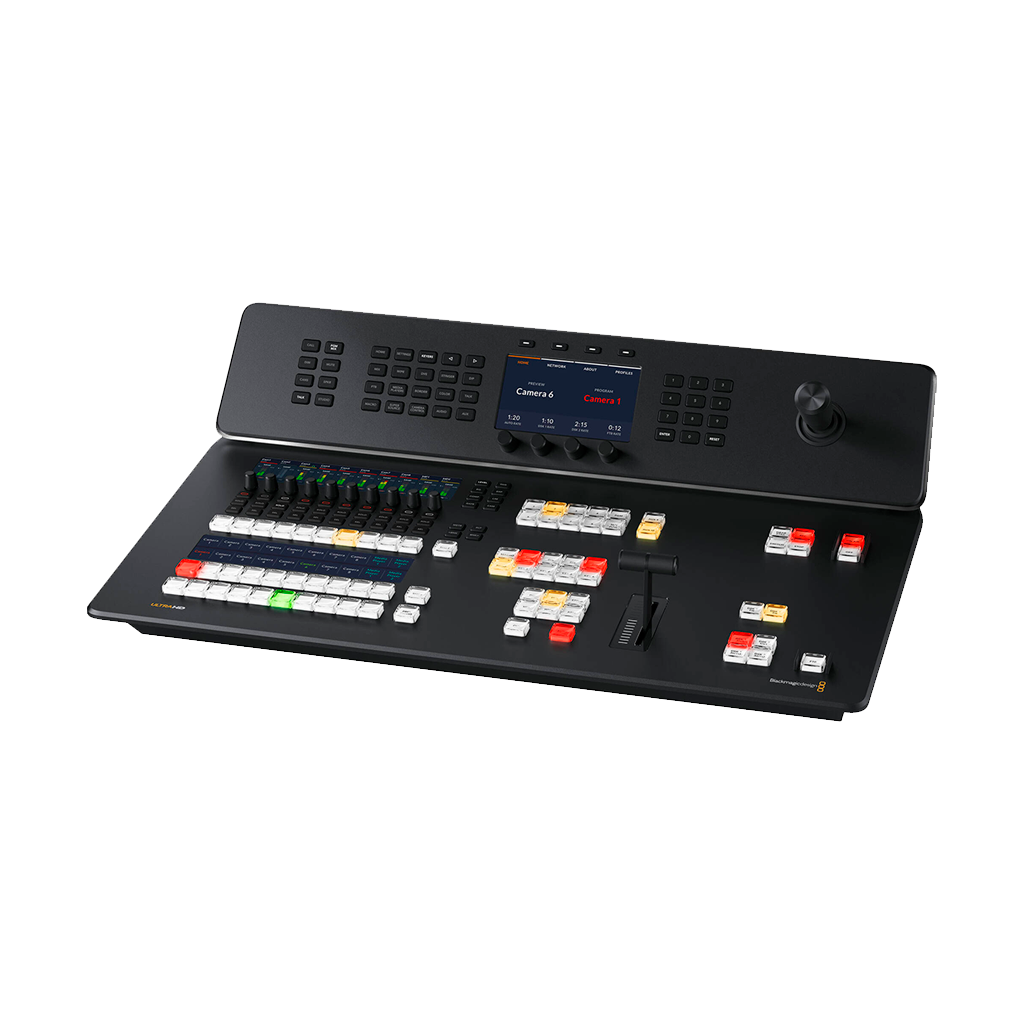
The Blackmagic Design ATEM Television Studio 4K8 is an all-in-one live streaming switcher that can be integrated into your television studio, remote production, or live venue. This ATEM Television Studio provides eight 12G-SDI inputs that support up to UHD 4K60 video, built-in live streaming, USB webcam support, a 58-channel audio mixer, chroma keyers, DVE, transitions, media players, internal recording, and talkback support.
The Blackmagic Design ATEM Television Studio 4K8 is also compatible with the Blackmagic Cloud, which allows your program recordings to be available immediately from anywhere around the world.
Distribution
With the Blackmagic Design ATEM Television Studio 4K8, you are able to live stream an event to a global audience with this built-in hardware streaming engine. It records to H.264 with AAC audio, which means it is natively in the correct format to upload to YouTube. You are also able to share a live broadcast with the audience by using aux outputs and large screens. and projectors.
Production Switcher Control
The Blackmagic Design ATEM Television Studio 4K8 is an advanced broadcast-grade switcher that features ATEM Advanced Chroma Keyers, Fairlight audio mixer, DVE, still store for graphics, and more.
Most of these features can be controlled from the front panel. Alternatively, you can employ the free-to-use ATEM Software Control on macOS or Windows to access even more features than found on the front panel.
Redesigned Front Panel
On the front panel, you will find individual buttons for selecting sources, triggering transitions, and setting up video effects. You will also find the same high-end type buttons found on expensive broadcast switchers. For manual transition control, you will also find a built-in T-bar along with a three-axis joystick.
Further, you will also find an innovative audio mixer-control area with live metering on a dedicated LCD screen. There are also buttons for recording and streaming control, plus live aux switching that lets you change aux outputs between all 8 cameras, program, preview, or the multiview.
Broadcast-Style Mix/Effects Switching
You will find a professional program/preview style of operation that is the same as found in large broadcasters live production switchers.
The Television Studio can also be switched to A/B style switching, which is much easier to use by volunteers or community groups. When using the program/preview style is selected, the source will not be put on air until the cut or auto button is pressed, which will reduce the risk of mistakes being made.
Add Exciting Video Effects
One of the Blackmagic Design ATEM Television Studio 4K8 is a range of professional built-in video effects. On the front panel, you will find the cut button that ensures an instant cut when switching sources. While the T-bar fader can be used to transition video effects, it can also be done automatically by pressing the auto button.
You can also select the type of effect you want, including mix, which does a smooth transition between sources, or dip, which transitions via a third video source, such as a colour generator. There is a wide range of SMPTE wipes included, plus DVE effects that slide or squeeze the image off-screen when transitioning between video sources.
Creative Transitions
The same kind of transitions can be found here as in expensive broadcast switchers. All transitions can be customised by adjusting parameters such as duration, border colour, border width, position and direction. You can even use the DVE with a wipe transition, where the DVE moves a graphic over the wipe edge.
Built-In DVE
The Blackmagic Design ATEM Television Studio 4K8 offers you an independent DVE allowing you to reposition graphics and create picture-in-picture compositions. The picture-in-picture effects allow you to add customisable 3D borders, shadows and lighting.
Using DVE, you can also add transition effects such as squeeze, swoosh, and push effects for added effects to the programming. Plus, there are also a SuperSource multilayer processing engine with 4 extra DVEs.
Supports Internal Media
By using the built-in media player, you are able to play back graphics and animations that are stored in the built-in media pool. All media players appear as independent sources, so there is no need for any of the SDIs to be used for graphics. To ensure the highest quality, all media supports RGB colour space with alpha channel, allowing transparency and layering.
The media pool can hold up to 20HD resolution stills. Motion graphics clips for animations and stingers can be up to 720 frames in 720HD, 360 frames in 1080HD, and 90 frames in UHD 4K. Media can be uploaded and managed in the ATEM Software Control.
Includes 4 ATEM Advanced Chroma Keyers
Another notable feature built into the Blackmagic Design ATEM Television Studio 4K8 is the 4 ATEM Advanced Chroma Keyers built in for green screen keying effects. This makes it perfect for news and on-set presentation work.
These keyers are incredibly powerful, as they include features such as a colour picker where you can sample backgrounds for automatic generation of keying parameters. You will find precise control over edge and flare, along with a foreground corrector. This enables you to match the foreground and background layers for seamless compositions. Tile overlays can also be created by creating graphics with a green or blue background.
SuperSource Processing
Further the DVE in the Television Studio, you will also find a powerful SuperSource multilayer processor. Giving you 4 extra DVE layers along with a background layer, all these are layered together as an additional input source.
Any video input can be used as a source for each DVE, this is then layered together over a media pool, custom background or live video. This is ideal for picture-in-picture displays with people being interviewed because you can set up the effect so that the viewer can see each person being interviewed.
8 Standards-Converted 12G-SDI Inputs
The Blackmagic Design ATEM Television Studio 4K8 features 8 independant 12G-SDI inputs, each with indapendant dedicated standard converter. This makes it possible to convert any input source to the HD or UHD video standard of the switcher. You can have each switcher's SDI input running a different television standard.
SDI input audio channels 1, 2, 3, and 4 can be manually routed to various embedded audio channels in the program and aux outputs. You can also route out audio channels 1 and 2 from the SDI inputs to the MADI digital audio output.
12G-SDI Outputs with 16-Channel Embedded Audio
Twelve 12G-SDI program outputs can be found, allowing you to get enough connections to send a separate program return feed to all of your cameras. The importance of this is that the SDI program is used to send tally, talkback, and control information back to he cameras.
You also get two dedicated aux outputs for driving stage monitors and master recorders. These can also be live-switched using the dedicated buttons on the control panel. You can also manually route audio into all 16 embedded audio channels in the SDI outputs. For camera monitoring, there is a dedicated 12G-SDI and HDMI 2.0 output for the multiview.
16-Source Multiview on a Single Monitor
In larger productions with multiple cameras, it is vital for you to see all video sources at once on a single monitor. The Blackmagic Design ATEM Television Studio 4K8 includes a professional multiview allowing you to see all video inputs, preview, and program on a single SDI or HDMI monitor. You can even send the multiview to the aux outputs.
Each camera view has tally indicators, showing which source is currently on air. Additionally, each source also has custom labels and audio meters.
The multiview layout can be customised with up to 16 simultaneous views.
Record Direct to Internal Cloud Storage or USB Disks
Recording to external USB flash disks is also supported. Alternatively, if an optional M-2 flash disk is installed, you can record directly to internal cloud storage. The internal as well as external USB disks can be available to be shared over local Ethernet networks. This will allow other people to work in post-production, such as editing, colour correction, and graphics preparation.
All recordings are in H.264 format with AAC audio for broadcast-quality video and small file sizes. On the panel, you will even find buttons to start recording, and you can see the record status in the multiview.
Outputs to Any Software that Supports USB Webcams
Any video software can be used with the ATEM Television Studio, as the USB connection will emulate a webcam. The software is then tricked into thinking the ATEM is a common webcam. This will then guarantee full compatibility with any video software and in full resolution 1080HD quality.
Now, a presentation from a professional broadcast studio can be done to software such as Zoom, Teams or Skype. For streaming, it also works with streaming software such as Open Broadcaster, XSplit Broadcaster, and more.
Includes Free ATEM Software Control Panel
The ATEM Software Control App opens the hidden power of the ATEM Television Studio, giving you access to all features built into the switcher. You can connect via USB, but when connected via Ethernet, you can connect multiple copies of ATEM Software Control on different computers.
Flexible and Redundant Power
The Blackmagic Design ATEM Television Studio 4K8 features a built-in design and includes a built-in power supply, eliminating the need for an external brick to be carried around. Simply plug into the AC mains and start your live production. For further flexibility, you will find both an AC and DC power connection.
Applications
Compact Broadcast Vans
With this being an all-in-one design, you can now build a new generation ultracompact broadcast van. Now you do not need racks of equipment, enabling you to eliminate clutter and for added stability, it can also be mounted to a desk.
Music Venues and Clubs
Even in downstairs and crowded venues where there is no space for racks of video equipment, the Television Studio can simply be carried in and out, even with the venue still crowded.
Online Education
It is also perfect for creating educational content. Using the ISO model records video inputs, allowing you to finesse edits, replace shots and add in colour correction.
It can also be connected to Zoom to include live chats with students.
Live Sports
The Blackmagic Design ATEM Television Studio 4K8 is perfect for live sports events, as it has a simple design that is easy for community volunteers to use. This Television Studio can be installed in sports clubs or taken on the road. With up to 8 cameras that can be connected, you'll catch angles.
Blackmagic Design ATEM Television Studio 4K8
| Available M/E Layers | |
| Effect Types | |
| Downstream Keys | |
| Generators | |
| Audio Mixing |
| Switching Type | |
| Latency | |
| Processing Resolution | |
| Color Processing |
| Number of Video Input Sources | |
| Video Inputs | |
| Input Video Format | |
| Audio Inputs | |
| Embedded Audio Input |
| Video Output Channels | |
| Video Outputs | |
| Output Video Format | |
| Audio Outputs | |
| Embedded Audio Output | |
| Multiview Output | |
| Monitor Output |
| Other I/O | |
| Video Standard Compliance |
| Transport Protocols |
| Screen Resolution |
| OS Compatibility | |
| OS Compatibility | |
| Processor | |
| Wi-Fi | |
| Bluetooth |
| Power I/O |
| Operating Conditions | |
| Storage Conditions | |
| Dimensions | |
| Weight |